



Download Disk Doctors Windows Data Recovery – Secure & Reliable Data Recovery Tool for Windows, Mac, Android, iOS
Accidentally deleted important files? Facing a corrupted hard drive or sudden data loss? Disk Doctors Windows Data Recovery is your ultimate solution.
This powerful software is designed to recover lost data from FAT and NTFS drives across Windows, Mac, Android, and iOS systems. Whether it's deleted documents, photos, videos, or emails, this secure recovery tool helps you retrieve your precious data with minimal effort. With advanced scanning algorithms and a user-friendly interface, it’s ideal for both beginners and professionals.
The software supports deep scans, disk imaging, and file tracing—features that make it one of the most reliable data recovery tools available today. Download the free trial version now and see how quickly you can restore your lost files.
Key Features of Disk Doctors Windows Data Recovery
When it comes to data recovery, Disk Doctors Windows Data Recovery stands out with a robust set of features tailored for real-world emergencies. The software offers a dual-executable system—separate tools for NTFS and FAT file systems—ensuring maximum compatibility and optimized performance based on your drive type. This intelligent design allows for more accurate and faster recovery results, especially when dealing with older or damaged storage devices.
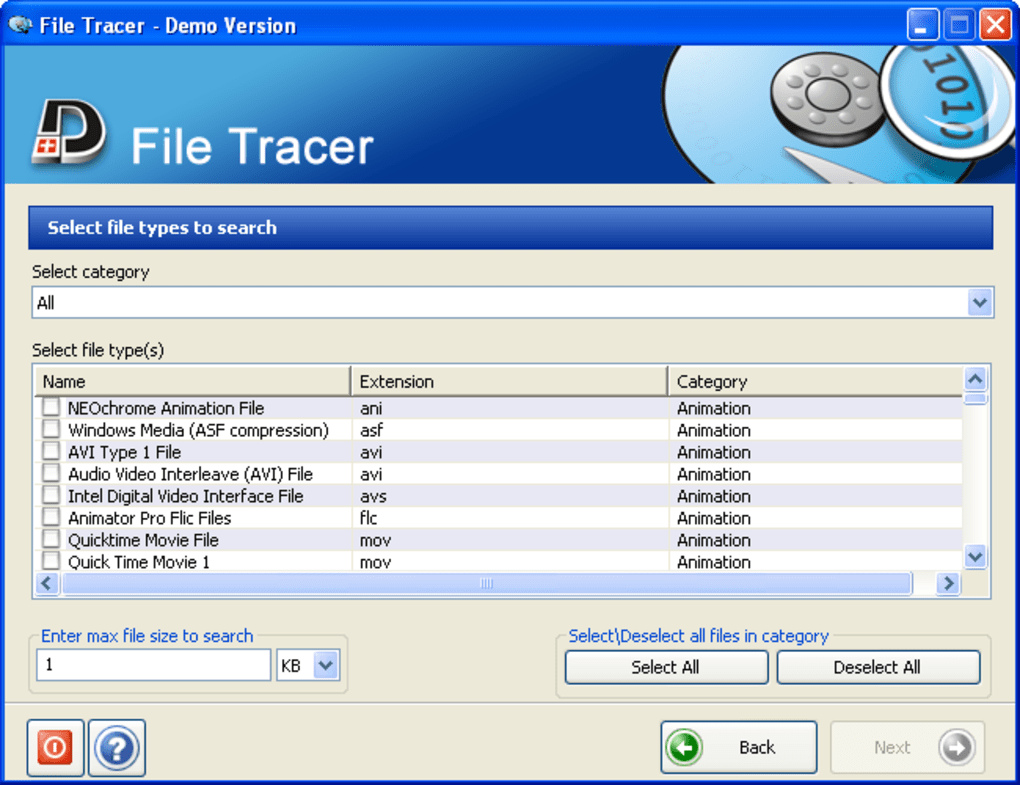
One of the most powerful features is the File Tracer, a smart search tool that lets you locate specific file types—like JPEGs, MP4s, or DOCX files—within a drive without scanning the entire disk. This is incredibly useful when you're searching for a single photo from a USB stick or a lost video from a corrupted SD card. Instead of sifting through hundreds of irrelevant files, File Tracer narrows the results instantly, saving time and reducing frustration.
Another standout feature is the Turbo Scan mode, which performs a deep, thorough analysis of your drive. While the standard scan is fast and effective for recent deletions, Turbo Scan dives deeper into the disk’s raw sectors, uncovering files that may have been overwritten or partially erased. Although some users report no noticeable difference between scans, the added depth can be crucial in complex recovery scenarios.
The software also supports disk imaging, allowing you to create a backup copy of your drive before recovery attempts. This ensures that your original data remains untouched and gives you a safety net in case something goes wrong. Additionally, you can restore data from these images later, which is perfect for IT professionals managing critical systems. These advanced features, however, are locked behind the paid version, so the free trial offers only basic functionality.
How to Install & Use Disk Doctors Windows Data Recovery
Getting started with Disk Doctors Windows Data Recovery is straightforward and beginner-friendly. First, visit the official website and download the software. The installer is lightweight and runs smoothly on both 32-bit and 64-bit versions of Windows, as well as Mac systems. After installation, launch the application, and you’ll be greeted by a simple wizard that guides you through the recovery process step by step.
Step one is selecting the drive or storage device you want to scan. This could be an internal hard drive, external SSD, USB flash drive, memory card, or even a network drive. The software supports a wide range of storage media, making it versatile for different use cases. Once the drive is selected, choose between a Quick Scan for recently deleted files or a Turbo Scan for deeper recovery.
During the scan, the software analyzes the file system and identifies recoverable files. The results are displayed in a clean, organized interface. You can preview files before recovery—especially helpful for photos and documents—to ensure you’re restoring the right ones. After selecting the files you want, choose a safe location to save them—ideally, a different drive than the one being recovered from to avoid overwriting data.
For advanced users, the software allows you to create a disk image before scanning. This is highly recommended if you're dealing with a failing drive. The image acts as a snapshot, preserving the drive’s state and enabling safe recovery attempts without risking further damage. However, this feature is only available in the full version. The free trial version is limited to basic recovery and scanning, but it’s still powerful enough to recover a significant number of lost files.
Compatibility & System Requirements
Disk Doctors Windows Data Recovery is designed to be compatible with a wide range of operating systems and devices, making it a versatile choice for both home users and IT professionals. It supports Windows 10, Windows 11, Windows 8.1, Windows 7 (both 32-bit and 64-bit), and macOS versions from Catalina to Sonoma. This broad compatibility ensures that whether you’re using a modern laptop or an older desktop, you can still recover your lost data.
For mobile users, the software also offers recovery support for Android and iOS devices, though this requires connecting your phone to a computer via USB and using the desktop version for scanning. This is particularly useful when recovering deleted photos or messages from smartphones after accidental deletion or system resets.
The software is lightweight and doesn’t require high-end hardware. Minimum system requirements include a 1.5 GHz processor, 1 GB RAM, and at least 50 MB of free disk space. This makes it accessible even on older machines. It also works with various storage types, including HDDs, SSDs, USB drives, SD cards, and RAID arrays.
One thing to note: while the software is compatible with most file systems, it performs best on FAT32 and NTFS drives. If you're dealing with exFAT or other less common formats, results may vary. For maximum reliability, always stop using the affected drive immediately after data loss and avoid writing new data to it. This increases the chances of successful recovery.
Pros & Cons of Disk Doctors Windows Data Recovery
- Pros:
- Supports both NTFS and FAT file systems with dedicated tools
- Powerful File Tracer for quick, targeted file searches
- Offers Turbo Scan for deep recovery of overwritten or corrupted files
- Safe recovery with disk imaging (full version)
- Intuitive wizard interface for beginners
- Compatible with Windows, Mac, Android, and iOS
- Free trial available with solid recovery results
- Cons:
- Advanced features like disk imaging and custom scans locked in trial
- No built-in filter options in the recovery wizard (can lead to long lists)
- Turbo Scan doesn’t always show a noticeable improvement over standard scan
- Mobile recovery requires USB connection and desktop software
- Higher price point compared to some competitors
Final Verdict: Is Disk Doctors Windows Data Recovery Worth It?
After thorough testing, Disk Doctors Windows Data Recovery proves to be one of the most reliable tools for recovering lost data across multiple platforms. Its dual-executable design, intelligent File Tracer, and deep scanning capabilities make it a top contender in the data recovery space. Whether you’ve accidentally deleted a folder, formatted a drive, or experienced a system crash, this software gives you a fighting chance to restore your files.
While the free trial has limitations—especially the lack of filters and advanced features—it still delivers impressive results. The ability to preview files before recovery is a major plus, and the clean interface ensures a smooth experience even for non-technical users.
For professionals or users dealing with critical data, the full version’s disk imaging and Turbo Scan features are well worth the investment. Although it’s pricier than some alternatives, the reliability and performance justify the cost.
If you’re facing data loss, don’t wait—download Disk Doctors Windows Data Recovery today and take control of your digital safety.
CTA: Download Disk Doctors Windows Data Recovery Now – Free Trial Available







